
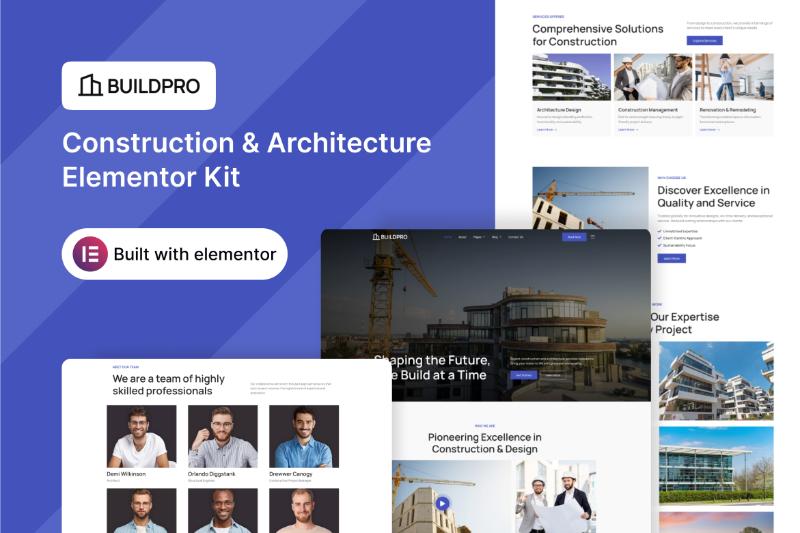
Building a professional website for a construction company, architecture firm, or related business does not have to start from a blank WordPress page.
BuildPro Elementor Template Kit is designed specifically for construction and architecture websites, giving businesses a ready-made visual foundation that can be customized with Elementor. BuildPro is part of Darrel Wilson’s collection of Elementor Template Kits for WordPress.
In this review, we’ll look at what BuildPro is, who it is designed for, what you need to use it, and whether this type of Elementor Template Kit could be a practical starting point for a construction or architecture website.
Affiliate Disclosure: This article contains affiliate links. If you purchase a product through one of our links, we may earn a commission at no additional cost to you.
What Is BuildPro Elementor Template Kit?
BuildPro is a Construction & Architecture Elementor Template Kit created for businesses that need a professional website without designing every page from scratch.
Instead of being a traditional WordPress theme, an Elementor Template Kit provides pre-designed layouts that can be imported and customized using Elementor.
BuildPro is listed by Darrel Wilson under the Business, Corporate, and Elementor Pro Templates categories.
This makes it particularly relevant for businesses such as:
- Construction companies
- Architecture firms
- Building contractors
- Property development companies
- Engineering businesses
- Renovation companies
- Interior and exterior design businesses
- Other construction-related service providers
If you already know what type of website you want but don’t want to spend days designing the layout from scratch, a specialized template kit can provide a useful starting point.
BuildPro Elementor Template Kit Features
One of the main reasons to consider a niche-specific template is that the design is already oriented toward the industry.
Instead of taking a generic business template and trying to transform it into a construction website, BuildPro is specifically positioned around construction and architecture.
That can help you create a more consistent website experience across your main pages.
Designed for Construction and Architecture
The biggest advantage of BuildPro is its specific focus.
A construction or architecture website often needs to communicate professionalism, experience, completed projects, services, and credibility.
A template designed around this type of business can make it easier to organize those elements into a professional website.
Elementor-Based Customization
BuildPro is an Elementor Template Kit, which means the design can be customized through Elementor rather than requiring you to edit the site’s design entirely through code.
This is particularly useful for small businesses and freelancers who want to make visual changes without building every section from scratch.
You can customize elements such as:
- Text
- Images
- Colors
- Fonts
- Buttons
- Sections
- Page layouts
- Branding elements
The exact customization experience will depend on your WordPress, Elementor, and Elementor Pro setup.
Do You Need Elementor Pro for BuildPro?
Yes. Darrel Wilson’s Elementor Template Kits that are created with Elementor Pro require the Elementor Pro plugin, and Elementor Pro is not included with the template purchase.
This is an important point to consider before purchasing.
The template kit itself is not a replacement for Elementor Pro. You will need the required Elementor plugins and a WordPress website to use the kit.
Darrel Wilson also recommends using a base or starter theme for Template Kits, with Hello Elementor/Hello Theme being one of the recommended options.
Is BuildPro a WordPress Theme?
No.
BuildPro is an Elementor Template Kit, not a standalone WordPress theme.
This distinction is important if you’re new to WordPress.
A WordPress theme provides the underlying theme framework for your website, while an Elementor Template Kit provides pre-designed layouts and page components that you can use with Elementor.
The advantage is that you can have more flexibility over the visual design while still starting with a professionally designed layout.
Who Is BuildPro Best For?
BuildPro is most relevant to businesses operating in construction and architecture.
Construction Companies
If you run a construction company and need a professional online presence, a construction-focused template can help you present your services, company information, and projects in a structured way.
Architecture Firms
Architecture firms often need a website that puts visual work and completed projects front and center.
A specialized architecture-oriented design can provide a stronger starting point than a generic corporate template.
Building Contractors
Contractors can use a professional website to explain their services, show completed projects, introduce their team, and provide contact information for potential clients.
Renovation Businesses
Home renovation and remodeling businesses can also benefit from an industry-specific website design that emphasizes services and visual project work.
Freelance Web Designers
BuildPro may also be useful for freelancers who frequently create websites for construction and architecture clients.
Instead of designing every project from zero, a template kit can serve as a starting framework that can then be customized for each client.
BuildPro vs. a Generic Elementor Template
One question you may have is:
Why use a construction-specific Elementor template instead of a generic business template?
The answer comes down to relevance.
A generic business template may give you a homepage, about page, services page, and contact page. However, you’ll still need to adapt the design to make it feel appropriate for a construction or architecture business.
A specialized template starts closer to the final result you want.
For example, a construction business generally needs to communicate:
- What services it offers
- What type of projects it handles
- Its experience
- Previous work
- Company credibility
- How potential customers can request information
Starting with a niche-specific template can reduce the amount of design work required to get there.
What You Should Prepare Before Installing BuildPro
Before purchasing or installing an Elementor Template Kit, it’s a good idea to have the basic components of your website ready.
1. WordPress Hosting
You’ll need a working WordPress website.
2. Elementor
BuildPro is designed for Elementor, so Elementor needs to be installed on your website.
3. Elementor Pro
Because the kit requires Elementor Pro, you’ll need to purchase and install Elementor Pro separately.
4. Your Business Content
Prepare your:
- Company logo
- Business description
- Services
- Contact information
- Project photos
- Team information
- Testimonials
- Social media links
Having these materials ready can make customization much faster.
What About the Images Used in the Demo?
One thing to pay attention to when using Elementor Template Kits is image licensing.
Darrel Wilson notes that demo images may require separate licensing, depending on the source. In other words, you should check the image license information before using demo imagery commercially. You can also replace the demo images with your own photographs.
For a construction or architecture website, using your own project photography can actually make the finished website much more relevant to your business.
BuildPro Pricing
Darrel Wilson currently lists individual premium Elementor Template Kits at $29, while the site also offers subscription and lifetime access options for its larger template collection.
Pricing can change, so it’s worth checking the official product page for the current price before purchasing.
Pros and Cons of BuildPro
Pros
- Designed specifically for construction and architecture websites
- Elementor-based visual customization
- Faster starting point than designing a website from scratch
- Suitable for several construction-related business types
- Can be customized with your own branding and content
- Useful for both business owners and web designers
Cons
- Elementor Pro is required
- Elementor Pro is not included with the template kit
- Demo images may require separate licensing
- You still need WordPress hosting and a suitable WordPress setup
- Some customization may be necessary to match your exact business requirements
Is BuildPro Worth Considering?
If you’re specifically looking for an Elementor Template Kit for a construction or architecture website, BuildPro is worth taking a closer look at because it starts with an industry-specific design rather than a generic business layout.
It’s especially relevant if your goal is to launch a professional construction, architecture, contracting, or related business website without designing every page from scratch.
However, remember that BuildPro is a template kit rather than a complete WordPress theme, and you’ll need Elementor Pro separately.
If you already have WordPress and Elementor Pro—or plan to use them—an industry-specific kit like BuildPro can give you a much faster starting point for your website.
Want to See BuildPro?
You can check the live product details and current pricing on Darrel Wilson’s official website.
[View BuildPro Elementor Template Kit]
Frequently Asked Questions
What is BuildPro Elementor Template Kit?
BuildPro is a Construction & Architecture Elementor Template Kit designed for WordPress websites in the construction and architecture industry.
Does BuildPro work with Elementor?
Yes. BuildPro is an Elementor Template Kit and is designed to be used with Elementor.
Do I need Elementor Pro for BuildPro?
Yes. Elementor Pro is required for the template kit, and the Elementor Pro plugin must be purchased separately.
Is BuildPro a WordPress theme?
No. BuildPro is an Elementor Template Kit. You still need a WordPress theme or starter theme for your website.
Who should use BuildPro?
BuildPro is designed for construction and architecture-related websites and may also be suitable for contractors, renovation businesses, property-related businesses, and other professional service companies in the building industry.
Can I customize BuildPro?
Yes. Elementor allows you to visually customize the template’s content and design elements to match your business branding.
Can I use the demo images?
Check the image licensing information associated with the template. Some demo images may require a separate license, and you can replace them with your own images.
Final Thoughts
BuildPro provides a niche-focused starting point for anyone looking to create a construction or architecture website with WordPress and Elementor.
Instead of starting with an empty page, you can begin with a professionally designed foundation and customize it with your own content, branding, project images, and services.
If you’re already using Elementor Pro and need a construction-focused website design, BuildPro is one Elementor Template Kit worth checking out.
