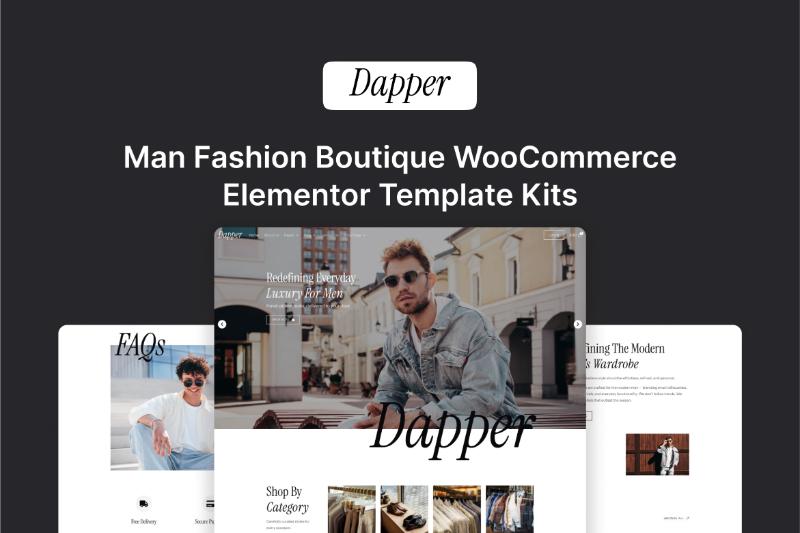
If you’re looking for a modern WordPress website template for a men’s fashion boutique, clothing store, tailor, or online fashion retailer, the Dapper Elementor Template Kit is designed specifically for this type of business.
Dapper is a premium Elementor Template Kit from Darrel Wilson that combines an elegant, modern fashion-focused design with WooCommerce functionality. It includes templates for the main website, shop, products, cart, checkout, customer account, blog, and other important pages needed for an online fashion store.
In this Dapper Elementor Template Kit review, we’ll look at its features, included templates, WooCommerce compatibility, Elementor Pro requirements, pricing, customization options, and how to get the official download.
What Is the Dapper Elementor Template Kit?
Dapper is a premium Elementor Template Kit created for men’s fashion boutiques, clothing stores, online fashion retailers, tailors, fashion designers, personal stylists, and similar businesses.
The design focuses on a sophisticated and contemporary visual style that can work well for brands selling men’s clothing, suits, accessories, and other fashion products.
Unlike a traditional WordPress theme, Dapper is an Elementor Template Kit. This means it provides pre-designed page and website templates that you can import and customize using Elementor rather than replacing your entire WordPress theme.
The official product page currently lists Dapper at $29 for the single-template option, with lifetime updates, a single-site license, and six months of support.
Dapper Elementor Template Kit Features
Dapper includes a collection of templates designed to help you build a complete men’s fashion website.
Some of the main features include:
- Elegant and modern fashion-focused design
- Elementor drag-and-drop editing
- WooCommerce integration
- Responsive layouts
- Shop and product templates
- Cart and checkout templates
- Customer account template
- Rewards page
- Affiliate page
- Reviews page
- Blog templates
- Careers page
- Contact page
- Style Guide
- Opt-in Popup
- Flexbox Containers
- Nested Elements
The templates are customizable, allowing you to change colors, typography, images, text, layouts, and other visual elements to match your brand.
Dapper Elementor Template Kit Download
If you’re searching for Dapper Elementor Template Kit Download, the safest option is to obtain the template through the official product page.
After purchasing the template, you can download the files and import them into your WordPress website.
The Dapper template is not intended to be a free or cracked WordPress theme. It is a premium Elementor Template Kit that requires the appropriate Elementor setup.
Official download:
[DOWNLOAD LINK]
Purchasing through the official source also gives you access to the applicable product updates and support included with the license.
What Pages Are Included?
One of the advantages of Dapper is the number of templates included in the kit.
The official product page lists the following page templates:
Home
The homepage provides the main presentation for your fashion brand. You can use it to highlight featured collections, products, promotions, brand information, and calls to action.
About Us
The About Us page can be used to introduce your fashion brand, explain your story, and establish trust with customers.
Rewards
Dapper includes a dedicated Rewards page that can be useful for businesses that want to promote customer loyalty programs.
Affiliates
An Affiliates page is also included. This can be customized for an affiliate or partner program associated with your fashion business.
Reviews
Customer reviews and testimonials can be displayed using the dedicated Reviews template to help provide social proof.
Careers
The Careers page can be used to publish job openings and provide information for potential employees.
Blog
The included blog templates allow you to publish fashion advice, styling guides, product news, company updates, and other content.
Single Post
The Single Post template provides the layout for individual blog articles.
Post Archive
The Post Archive template can be used to control how collections of blog posts are displayed.
Contact Us
The Contact Us page gives visitors a dedicated place to find contact information and reach your business.
WooCommerce Templates
Dapper is particularly useful for online fashion stores because it includes WooCommerce-related templates.
The official product page lists:
- Shop
- Single Product
- Product Archive
- Cart
- Checkout
- My Account
This means you can use Dapper as the design foundation for a complete fashion eCommerce website rather than only a simple business website.
For a men’s clothing store, you could use these templates to create product pages for suits, shirts, jackets, trousers, shoes, watches, accessories, or other fashion products.
Dapper for Men’s Fashion Boutiques
Dapper is specifically designed around men’s fashion, making it suitable for businesses that want a more polished and sophisticated visual identity.
Potential use cases include:
- Men’s clothing boutiques
- Online men’s fashion stores
- Suit stores
- Tailors
- Men’s apparel brands
- Fashion designers
- Personal stylists
- Luxury clothing retailers
- Men’s accessories stores
- Fashion consultants
The official product description specifically identifies men’s fashion boutiques, clothing stores, online fashion retailers, tailors, fashion designers, and personal stylists as suitable use cases.
Is Dapper Good for an Online Clothing Store?
Dapper can be used as a foundation for an online clothing store because it includes WooCommerce templates for important parts of the shopping experience.
For example, you can create:
Homepage → Product Archive → Product Page → Cart → Checkout → My Account
This gives you the basic structure needed for an online store while allowing you to customize the visual presentation through Elementor.
You will still need to configure WooCommerce, products, payment methods, shipping, taxes, and other eCommerce settings separately.
Does Dapper Require Elementor Pro?
Yes.
Dapper was created using Elementor Pro and requires Elementor, Elementor Pro, and WooCommerce according to the official product page.
Elementor Pro is not included with the Dapper Template Kit and must be purchased separately.
This is important to understand before purchasing because buying the template alone does not give you an Elementor Pro license.
Dapper Template Kit vs WordPress Theme
Dapper is not a traditional WordPress theme.
An Elementor Template Kit is a collection of pre-designed templates that work with Elementor. You still need a compatible base theme or starter theme for your WordPress website.
Darrel Wilson recommends using a lightweight starter theme such as Hello Elementor/Hello Theme for Template Kits.
The advantage is flexibility. You can customize the individual templates and adjust the design without being locked into the structure of a traditional theme.
Template Kit
- Designed for Elementor
- Requires a WordPress base theme
- Highly customizable
- Includes pre-designed page templates
- Can work with WooCommerce
- Elementor Pro is required for Dapper
WordPress Theme
- Controls the overall website theme structure
- Usually includes its own design system
- May include built-in customization options
- Can work independently of Elementor
If you’re already comfortable working with Elementor, a template kit can be a convenient way to get a professionally designed starting point without building every page from scratch.
Is Dapper Mobile Responsive?
Yes.
Dapper is designed to be responsive, meaning the layouts are intended to work across desktop computers, tablets, and mobile devices.
This is especially important for fashion stores because many customers browse products using smartphones.
However, after importing the templates, you should still check the responsive settings and test your pages on different screen sizes.
You may need to adjust:
- Font sizes
- Spacing
- Image sizes
- Column layouts
- Product grids
- Buttons
- Mobile menus
Can You Customize the Dapper Template?
Yes.
Dapper uses Elementor’s drag-and-drop interface, allowing you to customize the templates without having to manually code every page.
You can modify elements such as:
- Colors
- Fonts
- Images
- Logos
- Buttons
- Product layouts
- Sections
- Spacing
- Backgrounds
- Headers
- Footers
- Content
The official product page also describes the templates as extendable and customizable.
This makes it possible to start with the Dapper design and gradually adapt it to your own fashion brand.
Flexbox Containers and Nested Elements
Dapper uses Elementor’s Flexbox Container and Nested Elements features.
These features need to be active before importing the template kit.
If you’re installing the kit on a new WordPress website, make sure your Elementor environment is properly configured before importing the templates.
This can help prevent problems during the import process.
What About the Demo Images?
The template installation includes the images used in the demo, but you should pay attention to image licensing.
According to the official product page, Dapper uses demo images from Envato Elements. You need to license those images through the provided sources if you want to use them on your website, or replace them with your own images.
For a real fashion business, using your own professional product photography is generally the better approach anyway.
Your own photography can make the website more consistent with your actual products and brand identity.
Dapper Elementor Template Kit Pricing
At the time of this review, the single Dapp