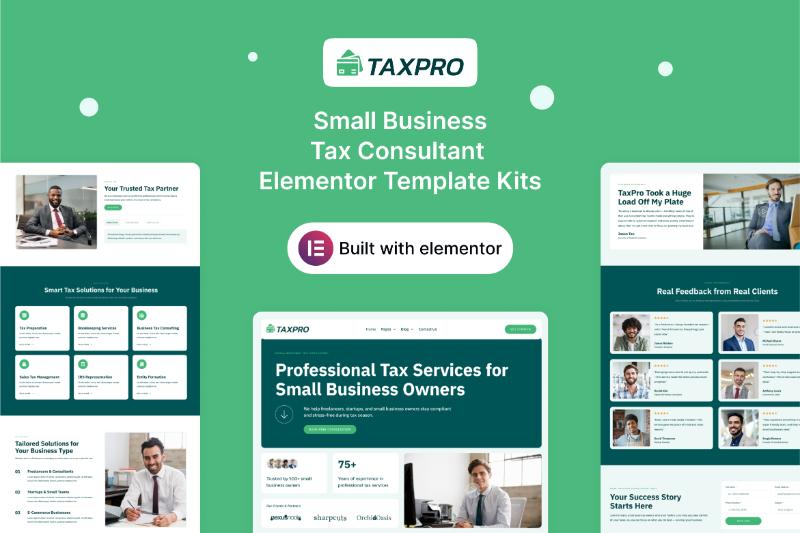
If you are looking for a professional WordPress website template for a tax consultant, accounting firm, financial planner, or small business tax service, the TaxPro Elementor Template Kit is worth considering.
TaxPro is designed specifically for businesses that provide tax consulting, accounting, financial planning, and related professional services. Its clean and modern layout provides a foundation for presenting services, products, clients, testimonials, pricing, and educational content.
In this TaxPro Elementor Template Kit review, we’ll look at its features, included page templates, Elementor requirements, customization options, pricing, and how to get the official download.
TaxPro Elementor Template Kit Overview
TaxPro is a professionally designed Elementor Template Kit created for tax and financial service professionals.
The official product page describes it as a complete website solution designed for small business tax consultants, accounting firms, and financial planning services.
Instead of creating a professional financial website from scratch, you can import the pre-designed TaxPro layouts and customize them with Elementor.
The template can be adapted for:
- Tax consultants
- Small business tax advisors
- Accounting firms
- Tax preparation services
- Financial planners
- Financial consultants
- Bookkeeping businesses
- Small business financial services
- Business advisory firms
The design is particularly useful for businesses that want a professional online presence without spending significant time designing every page from scratch.
TaxPro Key Features
TaxPro includes a collection of professionally designed page templates covering the main sections of a financial or tax consulting website.
The official product page lists templates for:
- Home
- About Us
- Solutions
- Products
- Clients
- Testimonials
- Pricing
- Careers
- FAQ
- Blog
- Single Post
- Post Archive
- Contact Us
- 404
- Coming Soon
- Style Guide
- Opt-in Popup
It also includes features such as a modern professional design, social media integration, Flexbox Containers, and Nested Elements.
This gives you a relatively complete website structure rather than just a homepage design.
TaxPro Elementor Template Kit Download
If you are searching for a TaxPro Elementor Template Kit download, the safest option is to get the official version directly from Darrel Wilson.
At the time of this review, the Single TaxPro Template is listed at $29 and includes lifetime updates, a single-site license, and six months of support.
[Get the Official TaxPro Elementor Template Kit]
Avoid websites offering an unauthorized “TaxPro free download.” Modified or unofficial copies may not provide the same updates, support, documentation, or licensing conditions as the official product.
For a professional tax or accounting website, using the properly licensed version is especially important.
What Can You Build With TaxPro?
TaxPro is flexible enough to work for several types of financial and tax-related businesses.
Tax Consulting Website
A tax consultant can use TaxPro to explain services, introduce the team, display testimonials, and provide useful tax-related information.
Possible services could include:
- Individual tax preparation
- Business tax consulting
- Tax planning
- Tax filing
- Tax compliance
- Tax advisory
- Small business tax services
Accounting Firm Website
Accounting firms can adapt the Solutions and Products sections to explain their accounting and advisory services.
For example, an accounting company could create sections for:
- Bookkeeping
- Payroll
- Business accounting
- Financial reporting
- Tax preparation
- Business advisory
- Accounting consultations
Financial Planning Website
Financial planners can use the templates to explain their approach, introduce advisors, publish educational content, and encourage potential clients to get in touch.
Small Business Advisor Website
Small business consultants can customize the design around business planning, financial management, tax consulting, and advisory services.
TaxPro Home Page
The homepage is the primary starting point for building your website with TaxPro.
You can customize the homepage to communicate:
- What your company does
- Who you serve
- Your main services
- Why customers should contact you
- Your areas of expertise
- Customer testimonials
- Calls to action
For a tax consulting business, the homepage could immediately communicate whether you specialize in individuals, small businesses, corporations, or another customer segment.
TaxPro Solutions Page
The Solutions template is useful for presenting the different services your company provides.
Instead of listing everything on the homepage, you can use this page to provide more detailed information about each service.
For example:
Tax Preparation
Explain your tax preparation process and who the service is designed for.
Tax Planning
Explain how your business helps clients prepare for future tax obligations.
Accounting
Describe bookkeeping, accounting, reporting, and related services.
Financial Planning
Explain your financial planning or advisory services.
The exact services should be customized to match what your business actually provides.
TaxPro Products Page
TaxPro also includes a Products page.
This can be adapted depending on the business model.
For example, a financial consultant could use this section for:
- Service packages
- Consulting packages
- Financial planning programs
- Tax preparation packages
- Digital financial resources
A business that doesn’t actually sell products could rename this section or repurpose the layout as another service page.
Clients Page
The Clients template can be used to showcase companies or customer groups that your firm serves.
For a B2B accounting or tax consulting company, this can be useful for communicating the types of businesses you work with.
If you have permission to display client logos, you can use this area to strengthen your company’s credibility.
Testimonials
TaxPro includes a dedicated Testimonials page.
Customer testimonials can provide social proof and help prospective clients understand the experiences of previous customers.
For financial and tax businesses, testimonials should be accurate and comply with any applicable professional or advertising requirements.
Pricing Page
TaxPro also includes a dedicated Pricing page.
This can be useful if your business offers clearly defined service packages.
For example:
- Individual Tax Package
- Small Business Package
- Business Advisory Package
- Monthly Accounting Package
If your business doesn’t publish pricing publicly, the page can be adapted into a consultation or service comparison page.
Careers Page
Growing accounting and tax firms can use the Careers page to promote open positions.
You can introduce your company culture and provide information for potential employees.
FAQ Page
Tax and accounting businesses often receive many questions before a potential client is ready to make contact.
The FAQ page can be used to answer questions about:
- Services
- Pricing
- Tax preparation
- Consultation process
- Documents required
- Business clients
- Appointment procedures
A useful FAQ can also help reduce repetitive customer inquiries.
TaxPro Blog and SEO
TaxPro includes Blog, Single Post, and Post Archive templates.
This makes it possible to build an educational content strategy around tax and financial topics.
For example, a tax consultant could publish articles such as:
- How to prepare for tax season
- Small business tax deductions
- Tax planning tips for small businesses
- Common bookkeeping mistakes
- How estimated taxes work
- Tax preparation checklist
- Accounting tips for small businesses
- When should a business hire an accountant?
Publishing genuinely useful content can help establish topical relevance while giving potential customers more reasons to visit your website.
Is TaxPro Responsive?
Yes. The official product information states that TaxPro is designed to display properly across desktop, mobile, and tablet devices.
Responsive design is particularly important for professional services because potential clients may find your business while searching from a mobile device.
Before publishing the website, you should still test important pages on:
- Desktop
- Laptop
- Tablet
- Smartphone
Pay particular attention to contact forms, navigation, buttons, pricing tables, and other conversion elements.
Does TaxPro Require Elementor Pro?
Yes.
TaxPro was created with Elementor Pro, and the official documentation states that Elementor and Elementor Pro are required. Elementor Pro is not included in the template kit and must be purchased separately.
You will also need a base WordPress theme or starter theme.
Darrel Wilson recommends using the Hello Elementor/Hello Theme for Template Kits.
What You Need
Before installing TaxPro, prepare:
- WordPress
- Elementor
- Elementor Pro
- A compatible WordPress theme
- Web hosting
- Domain name
The template also uses Flexbox Containers and Nested Elements, which should be activated before importing the kit.
TaxPro Template Kit vs. WordPress Theme
TaxPro is not a traditional WordPress theme.
It is an Elementor Template Kit.
A theme provides the underlying framework for your WordPress website, while an Elementor Template Kit provides a collection of pre-designed layouts.
This means you can use the TaxPro designs while still having significant control over the visual presentation of your website.
You can customize:
- Logo
- Colors
- Fonts
- Images
- Text
- Buttons
- Sections
- Spacing
- Services
- Testimonials
- Pricing
- Branding
This makes it possible to create a unique website instead of simply copying the demo.
Is TaxPro Easy to Customize?
TaxPro uses Elementor’s visual drag-and-drop interface.
If you are already familiar with Elementor, you can edit the templates without having to build each page manually.
You can replace the demo content with your own company information and customize the layouts around your services.
For example, an accounting firm could change the Solutions page to reflect its actual accounting services while keeping the overall design structure.
The Style Guide can also help maintain consistency across typography, colors, and other design elements.
TaxPro Pricing
At the time of this review, the TaxPro Single Template is listed at $29.
The Single plan includes:
- Lifetime updates
- Single-site license
- Six months of support
Darrel Wilson also offers All Access plans for users who want access to a larger collection of premium Elementor templates. The current product listing shows broader access options alongside the individual template.
Prices and plan details can change, so check the official TaxPro product page before purchasing.
What About the Demo Images?
The official Template Kit documentation states that demo images are included during installation, but they need to be properly licensed before being used on a live website. Alternatively, you can replace them with your own images.
For an accounting or tax consulting firm, using authentic team photos and professional office photography can make the website feel more trustworthy and personalized.
TaxPro Pros and Cons
Pros
- Designed specifically for tax and financial professionals
- Suitable for small business tax consultants
- Clean and professional design
- Includes Solutions and Products templates
- Includes Clients and Testimonials pages
- Includes Pricing and FAQ pages
- Includes Careers and Blog templates
- Responsive design
- Elementor drag-and-drop customization
- Flexbox and Nested Elements support
- Lifetime updates on the Single plan
- Affordable single-template price
Cons
- Elementor Pro is required
- Elementor Pro is not included
- Single-site license applies to the basic plan
- Hosting and domain are not included
- Demo images may require separate licensing
- Some sections may need to be adapted to your specific business model
Is TaxPro Worth Using?
TaxPro provides a focused starting point for businesses operating in tax consulting, accounting, and financial planning.
Its biggest advantage is the industry-specific structure.
Instead of taking a generic corporate template and creating every financial service page yourself, TaxPro already provides layouts for Solutions, Products, Clients, Testimonials, Pricing, FAQ, and other important sections.
This can significantly reduce the amount of design work required to get a professional website online.
The main consideration is that Elementor Pro is required separately.
If you already use Elementor Pro, TaxPro can be a practical foundation for building a professional tax or accounting website.
How to Get the TaxPro Elementor Template Kit
To get the official TaxPro Elementor Template Kit:
- Visit the official TaxPro product page.
- Review the available purchase options.
- Complete your purchase.
- Download the template kit.
- Install WordPress.
- Install Elementor and Elementor Pro.
- Prepare your WordPress theme.
- Enable Flexbox Containers and Nested Elements.
- Import the TaxPro templates.
- Replace the demo content.
- Add your services and company information.
- Customize your colors, fonts, images, and branding.
- Review the website on desktop and mobile.
- Test your contact forms.
- Publish your website.
Final Thoughts
The TaxPro Elementor Template Kit is designed specifically for tax consultants, accounting businesses, and financial planning services.
Its collection of Solutions, Products, Clients, Testimonials, Pricing, FAQ, Blog, and Contact templates gives businesses a strong starting point for creating a professional financial services website.
Tax consultants can use it to present their services and expertise, while accounting firms and financial planners can customize the layouts around their own business models.
If you want an Elementor-based website for a tax or accounting business without designing every page from scratch, TaxPro provides a ready-made foundation that can be adapted to your brand.
[Get the Official TaxPro Elementor Template Kit]
TaxPro Elementor Template Kit FAQ
Is TaxPro a WordPress theme?
No. TaxPro is an Elementor Template Kit. You still need WordPress and a compatible theme.
Who is TaxPro designed for?
TaxPro is designed for small business tax consultants, accounting firms, and financial planning services.
Does TaxPro require Elementor Pro?
Yes. Elementor Pro is required because the template was created using Elementor Pro.
Is Elementor Pro included with TaxPro?
No. Elementor Pro must be purchased separately.
How much does TaxPro cost?
The Single TaxPro Template is currently listed at $29, with lifetime updates, a single-site license, and six months of support.
Can I use TaxPro for an accounting firm?
Yes. The template can be customized for accounting firms, tax consultants, financial planners, and related professional services.
Can I customize TaxPro?
Yes. The templates can be customized through Elementor’s visual drag-and-drop editor.
Is TaxPro mobile-friendly?
Yes. The official product information states that TaxPro is designed to work across desktop, tablet, and mobile devices.
Are the demo images included?
The demo images are included during installation, but they need to be properly licensed before being used commercially. You can also replace them with your own images.
Where can I download TaxPro?
For the official version, use the TaxPro product page from Darrel Wilson rather than downloading an unofficial or modified copy.