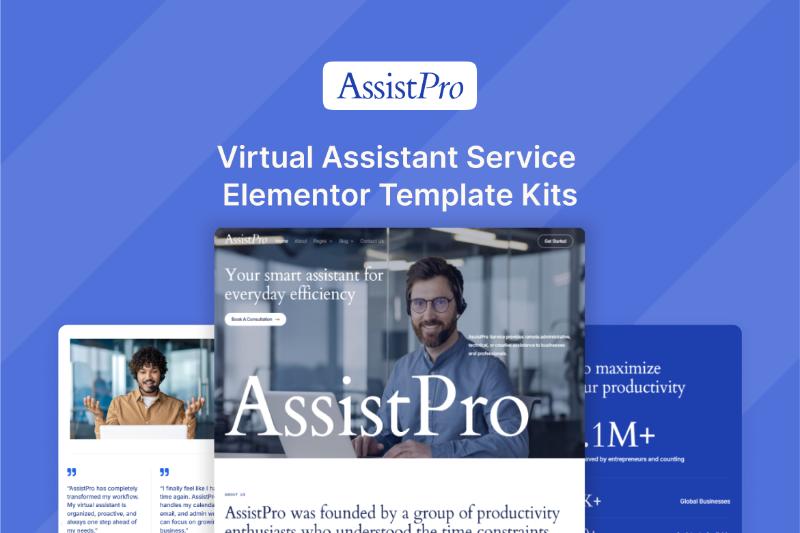
If you’re looking for a professional WordPress website template for a virtual assistant business, administrative support company, freelance service, or outsourcing agency, the AssistPro Elementor Template Kit is designed specifically for this type of website.
AssistPro is a premium Elementor Template Kit from Darrel Wilson created for virtual assistants, administrative support services, freelance professionals, online business managers, remote assistants, customer support specialists, and businesses offering outsourcing solutions.
The kit provides a clean and professional website structure with pages for services, pricing, industries, success stories, team members, careers, blog content, and more.
In this AssistPro Elementor Template Kit review, we’ll look at its features, included templates, requirements, customization options, pricing, licensing, and how to get the official download.
What Is the AssistPro Elementor Template Kit?
AssistPro is an Elementor Template Kit designed for businesses and professionals providing virtual assistant and administrative support services.
Instead of building a website completely from scratch, you can import the pre-designed templates and customize them with Elementor.
The official product description positions AssistPro for:
- Virtual assistants
- Administrative support services
- Freelance professionals
- Online business managers
- Remote assistants
- Customer support specialists
- Outsourcing businesses
This makes AssistPro more specialized than a generic corporate WordPress template.
AssistPro Elementor Template Kit Features
AssistPro uses a clean and professional design style intended to establish trust and communicate expertise.
Some of the main features include:
- Clean and professional layout
- Elementor drag-and-drop editing
- Responsive design
- About page
- Services page
- Pricing page
- Industries page
- How It Works page
- Success Stories page
- Our Assistants page
- Careers page
- Blog templates
- Social media integration
- Style Guide
- Contact page
- 404 page
- Coming Soon page
- Opt-in Popup
- Flex Container
- Nested Elements
The official product page states that the templates are extendible and customizable, allowing you to adapt the design to your own business.
AssistPro Elementor Template Kit Download
If you’re searching for AssistPro Elementor Template Kit Download, the safest option is to obtain the kit through the official product and download process.
AssistPro is a premium Template Kit rather than a free WordPress theme. Avoid unofficial or cracked copies because they can create licensing, security, and update problems.
Official download:
[DOWNLOAD LINK]
The current product listing shows the single AssistPro template at $29, including lifetime updates, a single-site license, and six months of support.
What Pages Are Included?
AssistPro includes a fairly comprehensive collection of pages for a virtual assistant or outsourcing website.
The official page lists the following templates:
- Home
- About
- Services
- Pricing
- Industries
- How It Works
- Success Stories
- Our Assistants
- Careers
- Blog
- Single Post
- Post Archive
- Contact Us
- 404
- Coming Soon
- Style Guide
- Optin Popup
This structure gives a virtual assistant business more than just a basic homepage and contact page.
Home Page
The homepage can serve as the main entry point for your virtual assistant business.
You can use it to explain:
- What your company does
- Who you help
- Your main services
- Why clients should choose your business
- Your pricing or packages
- Client success stories
- How to get started
The demo content should be replaced with information that reflects your actual business and target customers.
About Page
The About page gives you space to explain your company’s background and introduce your team.
For a virtual assistant business, this can be useful for establishing credibility and explaining your experience.
You could include:
- Company history
- Mission
- Team information
- Areas of expertise
- Industries served
- Company values
Services Page
The Services page is particularly important for a virtual assistant website.
You can use it to describe services such as:
- Administrative assistance
- Email management
- Calendar management
- Customer support
- Data entry
- Social media assistance
- Research
- Bookkeeping support
- Executive assistance
Only list services that your business actually provides.
Pricing Page
AssistPro includes a dedicated Pricing page.
This can be useful if your business offers clearly defined service packages.
For example, you could create packages based on:
- Number of hours
- Monthly support
- Service type
- Number of assistants
- Level of support
You can also use the page to direct visitors toward a consultation or custom quote if your pricing varies by client.
Industries Page
One of the interesting features of AssistPro is the dedicated Industries page.
A virtual assistant company can use this section to explain its experience in specific industries.
For example:
- Real estate
- E-commerce
- Healthcare
- Finance
- Marketing
- Technology
- Professional services
This can also provide opportunities for creating more targeted SEO content.
For example, instead of only targeting “virtual assistant services,” a business could create content around specific searches such as:
Virtual Assistant for Real Estate Agents
or
Virtual Assistant Services for Small Businesses
The actual pages should contain useful, original information rather than simply swapping the industry name.
How It Works Page
AssistPro also includes a How It Works page.
This is useful for explaining the process a potential client follows from the first inquiry through onboarding and ongoing support.
For example:
- Contact the company
- Discuss business needs
- Select a service package
- Match with an assistant
- Begin the workflow
- Monitor results
Your actual process can be customized to your business.
Success Stories
The Success Stories page can be used to showcase client results, testimonials, and case studies.
For a virtual assistant business, social proof can be particularly useful because potential customers need to feel confident about outsourcing important tasks.
You could include:
- Client testimonials
- Before-and-after results
- Case studies
- Productivity improvements
- Time saved
- Business outcomes
Make sure any results or testimonials published on the website are genuine and accurately represented.
Our Assistants Page
AssistPro includes an Our Assistants page for presenting members of your virtual assistant team.
This can be useful for agencies or businesses that provide multiple assistants rather than operating as a solo freelancer.
You could introduce each assistant with information such as:
- Name
- Role
- Skills
- Industry experience
- Languages
- Areas of specialization
This helps potential clients understand who may be supporting their business.
Careers Page
The Careers page can be used when a virtual assistant agency wants to recruit new team members.
You can publish:
- Open positions
- Job requirements
- Benefits
- Application instructions
- Company culture
- Available opportunities
For a growing outsourcing company, having a dedicated recruitment page can make the website more useful beyond lead generation.
Blog Templates
AssistPro includes templates for:
- Blog
- Single Post
- Post Archive
This gives you a foundation for publishing educational content and building organic search traffic.
A virtual assistant business could publish articles such as:
- What Does a Virtual Assistant Do?
- How to Hire a Virtual Assistant
- Virtual Assistant vs In-House Employee
- Best Tasks to Outsource
- How Virtual Assistants Help Small Businesses
- How Much Does a Virtual Assistant Cost?
- Virtual Assistant Services for Real Estate
- Virtual Assistant Services for E-commerce Businesses
These topics can target people who are researching virtual assistant services before becoming potential customers.
AssistPro for Freelancers
AssistPro isn’t limited to large virtual assistant agencies.
A solo freelancer can also adapt the template to create a professional personal service website.
For example, a freelance virtual assistant could use it to promote:
- Executive assistance
- Administrative support
- Email management
- Calendar management
- Customer service
- Research
- Social media management
You can simplify the pages and remove sections that aren’t relevant to a solo business.
AssistPro for Virtual Assistant Agencies
For an agency with multiple assistants, AssistPro offers several useful sections.
The Our Assistants, Industries, Services, Pricing, and Success Stories pages can be used together to create a complete agency website.
A possible structure could be:
Home
→ Services
→ Industries
→ Our Assistants
→ Pricing
→ Success Stories
→ How It Works
→ Contact
This provides visitors with a logical path from learning about the service to contacting the business.
Elementor Template Kit vs WordPress Theme
AssistPro is an Elementor Template Kit, not a traditional WordPress theme.
This distinction is important when planning your website.
A WordPress theme generally provides the overall framework and styling for your website.
An Elementor Template Kit provides a collection of pre-designed templates that work with Elementor.
Darrel Wilson’s FAQ explains that Template Kits require a base theme or starter theme and recommends Hello Elementor/Hello Theme.
Elementor Template Kit
- Designed for Elementor
- Includes pre-designed page templates
- Highly customizable
- Requires a compatible WordPress theme
- Can be adapted to different business models
- Uses Elementor’s visual editor
WordPress Theme
- Provides the overall theme framework
- Controls the site’s general styling
- May include theme-specific features
- Can be used independently of Elementor
For someone already comfortable with Elementor, a Template Kit can provide a faster starting point for building a professional website.
Does AssistPro Require Elementor Pro?
Yes.
According to the official AssistPro FAQ, the template was created with Elementor Pro, so you need the Elementor Pro plugin to use the Template Kit.
You’ll generally need:
- WordPress
- A compatible base theme
- Elementor
- Elementor Pro
Elementor Pro is not included with the AssistPro Template Kit.
Is Elementor Pro Included?
No.
The official product page explicitly states that Elementor Pro is not included in the Template Kit package and needs to be purchased separately.
This is important when calculating your total website-building cost.
The $29 AssistPro purchase should not be interpreted as including an Elementor Pro license.
Flex Container and Nested Elements
AssistPro uses Elementor’s Flex Container and Nested Elements features.
The official documentation states that these features need to be active before importing the Template Kit.
Before importing AssistPro, make sure your Elementor installation is properly configured.
Doing this beforehand can help avoid problems during the import process.
Is AssistPro Mobile Responsive?
Yes.
The official product description states that AssistPro uses a responsive design intended to work across laptops, mobile phones, and tablets.
However, after importing the templates, you should still manually check the website at different screen sizes.
Pay particular attention to:
- Heading sizes
- Button sizes
- Navigation
- Images
- Spacing
- Columns
- Contact forms
- Mobile menus
A responsive template provides a starting point, but final testing is still important.
Can You Customize AssistPro?
Yes.
AssistPro is designed to be customized using Elementor.
You can change elements such as:
- Logo
- Colors
- Fonts
- Images
- Text
- Buttons
- Sections
- Spacing
- Services
- Pricing
- Team members
- Testimonials
- Contact information
You can also modify individual template elements without necessarily changing every instance of the same design. Darrel Wilson explains that Template Kits allow individual template elements to be customized separately.
AssistPro and SEO
AssistPro provides the website design, but the Template Kit itself does not automatically make your website rank in Google.
You’ll still need to optimize:
- Page titles
- Meta descriptions
- Headings
- URLs
- Internal links
- Image alt text
- Page speed
- Structured data where appropriate
- Helpful content
- Backlinks
For a virtual assistant business, you could build an SEO content strategy around keywords such as:
- virtual assistant services
- virtual assistant agency
- virtual assistant for small business
- administrative support services
- online virtual assistant
- remote virtual assistant
- executive virtual assistant
- virtual assistant for real estate
- virtual assistant for entrepreneurs
- outsourced administrative support
The exact keywords should match the services and geographic market you’re targeting.
Local SEO for Virtual Assistant Businesses
Virtual assistants often work remotely, so a business may target clients nationally or even internationally.
However, if you provide services specifically to businesses in a certain location, AssistPro can also be adapted for local SEO.
For example:
Virtual Assistant Services in [City]
A local service page could include:
- Services offered
- Areas served
- Business contact information
- Local client information
- Testimonials
- Consultation options
- Frequently asked questions
Avoid creating large numbers of nearly identical location pages. Each page should provide genuinely useful information for the specific location.
Demo Images and Licensing
The official AssistPro page states that images are included in the installation. However, those images need to be properly licensed before being used on your live website, or you can replace them with your own images.
For a professional virtual assistant business, replacing the demo images with your own team photographs can also make the website more authentic.
If you have multiple assistants, professional headshots can be especially useful for the Our Assistants page.
AssistPro Pricing
The current official product page lists the single AssistPro Template Kit at $29.
The listed single-template package includes:
- Lifetime updates
- Single-site license
- Six months of support
Darrel Wilson also offers broader subscription options that provide access to its premium template library, but those are separate from the individual AssistPro purchase.
Because pricing and plans can change, check the official product page before purchasing.
Pros of AssistPro
Virtual assistant-focused design
AssistPro is designed specifically around virtual assistant and administrative support businesses.
Complete business structure
The kit includes pages for services, pricing, industries, processes, success stories, assistants, careers, and more.
Elementor customization
You can visually edit the templates using Elementor.
Team presentation
The Our Assistants page is useful for agencies with multiple virtual assistants.
Blog support
The included blog templates can support content marketing and SEO.
Responsive design
The templates are designed for desktop, tablet, and mobile devices.
Cons of AssistPro
Elementor Pro is required
Elementor Pro needs to be purchased separately.
It isn’t a complete WordPress theme
You still need a compatible WordPress base theme.
Content needs customization
The demo text should be replaced with your own business information.
Image licensing needs attention
The included demo images may require proper licensing or replacement.
Single-site license
The individual product is listed with a single-site license, so agencies should check the licensing terms before deploying it across multiple client websites.
Who Should Use AssistPro?
AssistPro is particularly relevant for:
- Virtual assistants
- Virtual assistant agencies
- Administrative support companies
- Freelancers
- Online business managers
- Remote assistants
- Customer support companies
- Outsourcing companies
- Executive assistants
- Remote service businesses
It can also be adapted for other professional service businesses if the design and page structure fit the business.
Who May Not Need AssistPro?
AssistPro may not be the best starting point for businesses unrelated to virtual assistance, administration, outsourcing, or professional support services.
For example, an online fashion store would generally need an eCommerce-focused template, while a construction company would benefit from a construction-specific design.
The main advantage of AssistPro is its specialized business structure.
How to Get the AssistPro Elementor Template Kit
Step 1: Purchase AssistPro
Purchase the Template Kit through the official product page.
Step 2: Prepare WordPress
Install WordPress on your hosting account and configure your website.
Step 3: Install a Compatible Theme
Use a compatible base or starter theme. Darrel Wilson recommends Hello Elementor/Hello Theme for Template Kits.
Step 4: Install Elementor
Install Elementor and Elementor Pro.
Step 5: Activate Required Features
Make sure Flex Container and Nested Elements are active before importing the kit.
Step 6: Import AssistPro
Import the AssistPro templates into your WordPress website.
Step 7: Customize Your Website
Replace the demonstration content with:
- Company logo
- Brand colors
- Team photos
- Services
- Pricing
- Industries
- Testimonials
- Contact information
- Social media profiles
Step 8: Optimize for SEO
Configure your:
- SEO titles
- Meta descriptions
- Headings
- URLs
- Image alt text
- Internal links
- Schema
- Page speed
Step 9: Test the Website
Before launching, test your website on desktop, tablet, and mobile.
Make sure all:
- Forms
- Buttons
- Navigation links
- Contact information
- Calls to action
- Mobile menus
work correctly.
AssistPro Elementor Template Kit Review: Final Thoughts
The AssistPro Elementor Template Kit is designed specifically for virtual assistant and administrative support businesses.
Its page structure goes beyond a basic business website by including dedicated pages for services, pricing, industries, processes, success stories, assistants, careers, and blog content.
The current single-template price is $29, with lifetime updates, a single-site license, and six months of support listed on the official product page.
The main requirements to keep in mind are Elementor Pro and a compatible WordPress base theme. Elementor Pro is not included in the Template Kit.
For a virtual assistant, freelancer, or outsourcing company that wants to build a professional WordPress website with Elementor, AssistPro provides a ready-made foundation that can significantly reduce the amount of design work required.
[YOUR AFFILIATE LINK]
AssistPro Elementor Template Kit FAQ
What is AssistPro?
AssistPro is a Virtual Assistant Service Elementor Template Kit from Darrel Wilson.
Who is AssistPro designed for?
It is designed for virtual assistants, administrative support services, freelance professionals, online business managers, remote assistants, customer support specialists, and outsourcing businesses.
Is AssistPro a WordPress theme?
No. AssistPro is an Elementor Template Kit and requires a compatible WordPress base theme.
Does AssistPro require Elementor Pro?
Yes. The template was created with Elementor Pro, so Elementor Pro is required.
Is Elementor Pro included?
No. Elementor Pro must be purchased separately.
How much does AssistPro cost?
The single AssistPro Template Kit is currently listed at $29 on the official Darrel Wilson product page.
Can I customize AssistPro?
Yes. You can customize the templates using Elementor, including colors, fonts, images, text, layouts, services, pricing, and other content.
Is AssistPro responsive?
Yes. The official product description states that the design is responsive for laptops, mobile phones, and tablets.
Does AssistPro include a blog?
Yes. The kit includes Blog, Single Post, and Post Archive templates.
Can I use AssistPro for a virtual assistant agency?
Yes. The included Our Assistants, Services, Industries, Pricing, Success Stories, and Careers pages are particularly relevant to an agency model.
Are the demo images included?
The images are included in the installation, but they need to be properly licensed before use on a live website, or you can replace them with your own images.
Can I use AssistPro on multiple websites?
The individual product is listed with a single-site license. If you need to use it on multiple client websites, check Darrel Wilson’s current licensing options before purchasing.
Where can I download AssistPro?
Use the official purchase and download process. Avoid unofficial or cracked downloads to maintain proper licensing, updates, and security.