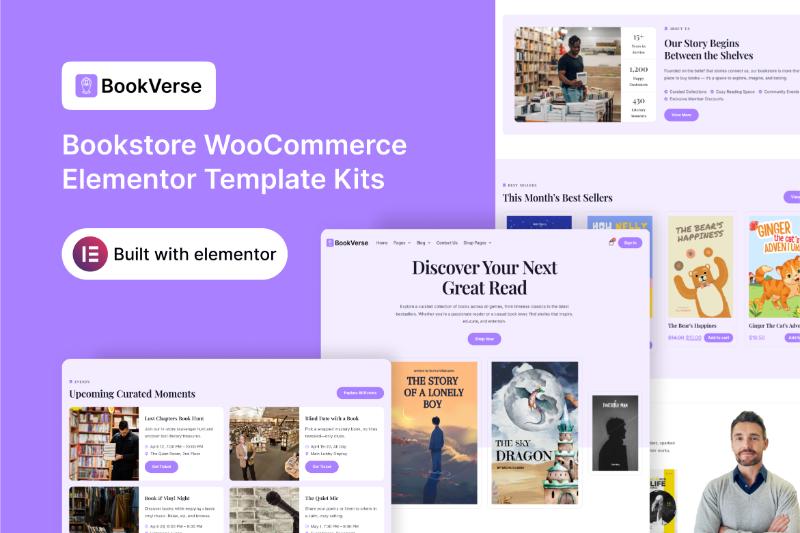
If you’re planning to build an online bookstore, library website, eBook shop, or book-related eCommerce business, choosing the right website template can save you considerable time.
The BookVerse Elementor Template Kit is a premium WordPress template designed specifically for bookstores and businesses selling books or reading-related products. It combines a clean, minimal design with WooCommerce functionality, making it a suitable starting point for building an online bookshop.
In this BookVerse Elementor Template Kit review, we’ll explore its features, included page templates, WooCommerce capabilities, pricing, installation requirements, and how to get the official download.
What Is the BookVerse Elementor Template Kit?
BookVerse is a premium Elementor Template Kit developed by Darrel Wilson. It is designed for online bookstores, libraries, eBook shops, authors, publishers, and other businesses that sell books or reading-related materials.
The template features a clean and minimal design that puts books and their content at the center of the shopping experience.
Instead of building an entire website from scratch, you can import the pre-designed templates and customize them using Elementor’s visual editor.
BookVerse is particularly suitable for businesses that want to showcase new releases, promote upcoming books, display their collections, and sell products through WooCommerce.
BookVerse Elementor Template Kit Features
BookVerse includes a collection of pre-designed templates and features intended to help you build a complete bookstore website.
Some of its key features include:
- Clean and minimal design
- Elementor drag-and-drop editor
- WooCommerce integration
- Responsive layouts
- New Releases page
- Pre-Orders page
- Store Location page
- About page
- Careers page
- FAQ page
- Blog templates
- Shop page
- Single Product template
- Product Archive template
- Cart and Checkout templates
- My Account page
- Social media integration
- Style Guide
- Flex Container
- Nested Elements
The templates are customizable, allowing you to adjust the design, colors, typography, images, and content to match your bookstore’s branding.
BookVerse Elementor Template Kit Download
If you’re searching for BookVerse Elementor Template Kit Download, you can purchase and download the template through the official Darrel Wilson product page.
BookVerse is a premium template kit, not a free WordPress theme. Purchasing it through the official source gives you access to the product under its applicable license.
Official download:
[DOWNLOAD]
The single-template option is currently listed at $29 and includes lifetime updates, a single-site license, and six months of support.
Always check the official product page for the latest pricing and licensing information.
What Pages Are Included in BookVerse?
BookVerse includes a range of page templates designed for the needs of an online bookstore.
The official product page lists the following templates:
- Home
- About
- New Releases
- Pre-Orders
- Store Location
- Careers
- FAQ
- Blog
- Single Post
- Post Archive
- Contact Us
- Shop
- Single Product
- Product Archive
- My Account
- Cart
- Checkout
- 404
- Coming Soon
- Style Guide
- Opt-in Popup
These templates provide a foundation for creating a bookstore website with both informational and eCommerce pages.
Homepage
The homepage is the main entry point for your bookstore website.
You can use it to introduce your brand, showcase featured books, promote new releases, and direct visitors to your product collections.
For an online bookstore, the homepage could include:
- Featured books
- New arrivals
- Popular categories
- Best-selling titles
- Special promotions
- Upcoming releases
- Author highlights
- Calls to action
You can customize the homepage to reflect your bookstore’s identity and highlight the products you want customers to discover.
About Page
The About page gives you an opportunity to introduce your bookstore and explain its mission.
You can use it to share your company’s story, explain what makes your store different, and build trust with potential customers.
For example, an independent bookstore could use this page to explain its focus on local authors, rare books, educational materials, or carefully selected collections.
New Releases Page
One of BookVerse’s notable features is its dedicated New Releases page.
This template is useful for bookstores that regularly add new titles to their collections.
You can use it to showcase recently published books, new arrivals, or recently added products.
For example, an online bookstore could organize its new releases into categories such as fiction, nonfiction, business, education, and children’s books.
Keeping this page updated can help returning customers discover new products.
Pre-Orders Page
BookVerse also includes a dedicated Pre-Orders page.
This can be useful for bookstores that want to promote upcoming books before their official release dates.
You could use the page to showcase upcoming titles, introduce authors, display expected release dates, and provide information about pre-order availability.
However, the template itself does not automatically configure pre-order functionality. You’ll need an appropriate WooCommerce setup or compatible extension if you want customers to place pre-orders.
Store Location Page
For bookstores with a physical location, the Store Location page provides a place to display important information about the store.
You can customize it with:
- Store address
- Opening hours
- Contact information
- Directions
- Embedded map
- Store photographs
This page can be particularly useful for businesses that operate both online and offline.
If you run an online-only bookstore, you can repurpose the page to display shipping information, service areas, or other relevant business details.
Careers Page
BookVerse includes a Careers page that can be used to publish job opportunities.
A bookstore could use this page to advertise positions such as:
- Store assistants
- Customer support representatives
- Warehouse staff
- Book buyers
- Marketing specialists
- Content editors
You can customize the page to explain your company culture, available positions, and application process.
FAQ Page
The FAQ page allows you to answer common customer questions.
For an online bookstore, useful topics might include:
- Shipping and delivery
- Payment methods
- Order tracking
- Returns and refunds
- Pre-orders
- Digital book delivery
- Account registration
- Customer support
Providing clear answers can help customers understand your policies before placing an order.
Blog Templates
BookVerse includes Blog, Single Post, and Post Archive templates.
These templates provide a foundation for publishing articles related to books, authors, reading, and literature.
For example, you could publish:
- Book reviews
- Author interviews
- Reading recommendations
- Book lists
- Literary news
- Reading guides
- New release announcements
- Educational articles
A blog can also support your bookstore’s SEO strategy by targeting relevant searches and attracting readers who may later become customers.
WooCommerce Integration
One of the main advantages of BookVerse is its WooCommerce integration.
The kit includes several eCommerce templates:
- Shop
- Single Product
- Product Archive
- Cart
- Checkout
- My Account
These templates provide a design foundation for the main parts of an online bookstore.
You can use them to display books, organize product collections, and customize the shopping experience.
For example, a bookstore could create categories such as:
- Fiction
- Nonfiction
- Business
- Self-help
- Education
- Children’s Books
- Comics
- Academic Books
- eBooks
You’ll still need to configure WooCommerce separately, including your products, payment methods, shipping options, taxes, and store settings.
BookVerse for eBook Shops
BookVerse can also be adapted for businesses selling eBooks and other digital reading materials.
You can customize the product pages to display book covers, descriptions, author information, formats, and pricing.
For digital products, WooCommerce allows you to configure downloadable products. You’ll need to set up the appropriate product and download settings separately.
If you plan to sell eBooks, make sure your digital products are properly licensed and that your delivery process works before launching the store.
BookVerse for Authors and Publishers
BookVerse may also be useful for independent authors and publishers who want to sell books directly through their own websites.
An author could use the template to create a website that includes:
- Author biography
- Book catalog
- New releases
- Upcoming books
- Book descriptions
- Reader reviews
- Blog articles
- Contact information
Publishers could also adapt the design to showcase their catalogs and organize books by genre, author, or publication date.
BookVerse for Libraries and Educational Businesses
The official product description also identifies libraries and educational resource websites as potential use cases.
A library or educational business could adapt the templates to present its collections, services, resources, and other information.
For example, an educational resource website might use the design to sell textbooks, study guides, workbooks, or other reading materials.
If the website is intended primarily for catalog browsing rather than online sales, you can customize or remove the eCommerce sections that aren’t needed.
Is BookVerse Mobile Responsive?
Yes. The official product description states that BookVerse features a responsive design for laptops, mobile phones, and tablets.
This is important for an online bookstore because visitors may browse book collections and place orders from different devices.
After importing the templates, you should still test the website on different screen sizes.
Pay attention to:
- Navigation menus
- Product grids
- Book cover images
- Font sizes
- Buttons
- Spacing
- Shopping cart
- Checkout forms
A responsive template provides a starting point, but testing your actual website is still necessary.
Does BookVerse Require Elementor Pro?
Yes.
According to the official product page, BookVerse requires Elementor and Elementor Pro, along with WooCommerce.
Elementor Pro is not included in the Template Kit package and must be purchased separately.
Before purchasing BookVerse, make sure you have the necessary plugins and a compatible WordPress setup.
Is BookVerse a WordPress Theme?
No. BookVerse is an Elementor Template Kit, not a traditional WordPress theme.
A Template Kit is a collection of pre-designed page layouts that you can import and customize using Elementor.
You still need a WordPress base theme to run your website. Darrel Wilson recommends using Hello Elementor or Hello Theme as a lightweight starting point.
Elementor Template Kit
- Provides pre-designed page templates
- Uses Elementor for visual editing
- Allows customization of individual layouts
- Requires a compatible WordPress theme
- Can be used with WooCommerce when supported
Traditional WordPress Theme
- Provides the overall website framework
- Usually includes its own styling and customization options
- May include built-in features
- Can be used without Elementor, depending on the theme
If you already use Elementor, a Template Kit can be a convenient way to build a website without designing every page from scratch.
Can You Customize BookVerse?
Yes. BookVerse is designed to be customized using Elementor’s visual editor.
You can adjust:
- Colors
- Fonts
- Images
- Text
- Logos
- Buttons
- Layouts
- Spacing
- Product sections
- Backgrounds
- Branding elements
This makes it possible to adapt the template to different types of bookstores.
For example, an independent bookstore might prefer a warm and welcoming visual identity, while a publisher could use a more editorial design.
You can also replace the demo content with your own book covers, product descriptions, author information, and store details.
Flex Container and Nested Elements
BookVerse uses Elementor’s Flex Container and Nested Elements features.
The official product page states that these features need to be active before importing the Template Kit.
Make sure your Elementor installation is configured correctly before starting the import process.
This can help prevent problems during installation.
Demo Images and Licensing
The demo images are included in the installation, but you should pay attention to their licensing requirements.
According to the official product page, you need to license the images through the provided links before using them on your live website. Alternatively, you can replace them with your own images.
For an online bookstore, using your own product photography and properly licensed book covers is particularly important.
Make sure you have permission to use the images and book cover artwork displayed on your website.
BookVerse Pricing
The single BookVerse Elementor Template Kit is currently listed at $29 on the official Darrel Wilson website.
The individual purchase includes:
- Lifetime updates
- Single-site license
- Six months of support
Darrel Wilson also offers broader access plans for its premium template library. These are separate from the individual BookVerse purchase.
Prices and subscription terms can change, so check the official product page for the latest information before purchasing.
Pros of BookVerse
Bookstore-focused design
BookVerse is designed specifically for bookstores and businesses selling books or reading-related products.
WooCommerce templates
The included Shop, Single Product, Product Archive, Cart, Checkout, and My Account templates provide a foundation for an online store.
New Releases and Pre-Orders pages
These dedicated pages can help bookstores showcase recently published and upcoming titles.
Flexible customization
You can edit the templates using Elementor and adapt them to your brand.
Blog support
The included blog templates can support book reviews, author interviews, reading recommendations, and SEO content.
Multiple business applications
The kit can be adapted for bookstores, libraries, eBook shops, authors, publishers, and educational resource websites.
Cons of BookVerse
Elementor Pro is required
You need to purchase Elementor Pro separately.
WooCommerce setup is necessary
The kit provides the design templates, but you must configure WooCommerce and your store settings.
Not a standalone WordPress theme
You need a compatible base theme to use the Template Kit.
Demo image licensing
Some demo images require separate licensing or replacement with your own images.
Single-site license
The individual purchase is listed with a single-site license. If you’re a developer or agency planning to use the kit on multiple websites, check the available licensing options.
Who Should Use the BookVerse Elementor Template Kit?
BookVerse is designed for businesses and professionals who want to build a book-related website using WordPress and Elementor.
It may be suitable for:
- Online bookstores
- Independent bookstores
- eBook shops
- Libraries
- Book publishers
- Independent authors
- Educational resource websites
- Literary blogs with eCommerce features
- Antiquarian bookshops
- Businesses selling reading materials
It’s particularly relevant if you want a website that combines book discovery, editorial content, and online shopping.
Who May Not Need BookVerse?
BookVerse may not be the right choice if you’re building a website unrelated to books, literature, education, or publishing.
For example, a fashion retailer would generally need a clothing-focused template, while a construction company would benefit from a construction-specific design.
The main advantage of BookVerse is its book-focused layout and eCommerce structure, so it makes the most sense when those features match your business.
How to Get the BookVerse Elementor Template Kit
Step 1: Purchase BookVerse
Visit the official Darrel Wilson product page and purchase the BookVerse Template Kit.
Step 2: Prepare Your WordPress Website
Install WordPress on your hosting account and configure your website.
Step 3: Install a Compatible Theme
Use a compatible WordPress base theme. Darrel Wilson recommends Hello Elementor or Hello Theme.
Step 4: Install Elementor and Elementor Pro
Install the Elementor and Elementor Pro plugins. Remember that Elementor Pro is sold separately.
Step 5: Install WooCommerce
If you’re building an online bookstore, install and configure WooCommerce.
Step 6: Activate Required Elementor Features
Make sure Flex Container and Nested Elements are active before importing the kit.
Step 7: Import the Templates
Import the BookVerse templates into your WordPress website.
Step 8: Customize Your Website
Replace the demo content with your own:
- Book covers
- Product descriptions
- Author information
- Store logo
- Brand colors
- Product categories
- Pricing
- Contact information
- Store location
Step 9: Configure WooCommerce
Set up your products, payment methods, shipping options, taxes, and other store settings.
If you’re selling eBooks, configure the downloadable product settings as well.
Step 10: Test Your Website
Before launching, test your website on desktop, tablet, and mobile devices.
Check your product pages, shopping cart, checkout process, contact forms, and navigation menus.
BookVerse Elementor Template Kit Review: Final Thoughts
The BookVerse Elementor Template Kit is a specialized website design for online bookstores, libraries, eBook shops, authors, publishers, and educational resource businesses.
Its main features include a clean and minimal design, dedicated New Releases and Pre-Orders pages, and WooCommerce templates for the online shopping experience.
The kit also includes blog templates, which can be useful for publishing book reviews, author interviews, reading recommendations, and other literary content.
The single-template option is currently listed at $29 and includes lifetime updates, a single-site license, and six months of support.
Before purchasing, remember that Elementor Pro is required but not included. You’ll also need to configure WooCommerce and pay attention to demo image licensing.
For businesses that want to build a book-focused website with WordPress and Elementor, BookVerse provides a ready-made foundation that can reduce the time needed to design a complete website.
[YOUR AFFILIATE LINK]
BookVerse Elementor Template Kit FAQ
What is BookVerse?
BookVerse is a Bookstore WooCommerce Elementor Template Kit from Darrel Wilson. It is designed for online bookstores, libraries, eBook shops, and other book-related businesses.
Is BookVerse a WordPress theme?
No. BookVerse is an Elementor Template Kit. You need a compatible WordPress base theme to use it.
Does BookVerse require Elementor Pro?
Yes. The official product page lists Elementor and Elementor Pro as required plugins.
Is Elementor Pro included with BookVerse?
No. Elementor Pro must be purchased separately.
Does BookVerse work with WooCommerce?
Yes. BookVerse includes WooCommerce templates such as Shop, Single Product, Product Archive, Cart, Checkout, and My Account.
How much does BookVerse cost?
The single-template option is currently listed at $29 on the official Darrel Wilson website.
Can I use BookVerse to sell eBooks?
Yes. You can adapt the design for an eBook store. You’ll need to configure WooCommerce downloadable products and the appropriate delivery settings.
Does BookVerse include a Pre-Orders page?
Yes. BookVerse includes a dedicated Pre-Orders page. However, you may need a compatible WooCommerce extension or additional configuration to enable actual pre-order functionality.
Is BookVerse mobile responsive?
Yes. The official product description states that the design is responsive for laptops, mobile phones, and tablets.
Can I customize BookVerse?
Yes. You can customize the templates using Elementor, including colors, typography, images, text, and layouts.
Are the demo images included?
The images are included in the installation, but they need to be licensed through the provided sources before use on a live website. You can also replace them with your own images.
Where can I download BookVerse?
You can purchase and download BookVerse through the official Darrel Wilson product page.